Put it under your own roof.

Every tile for one household in one Postgres database, in Docker on a machine you own. Free to self-host.

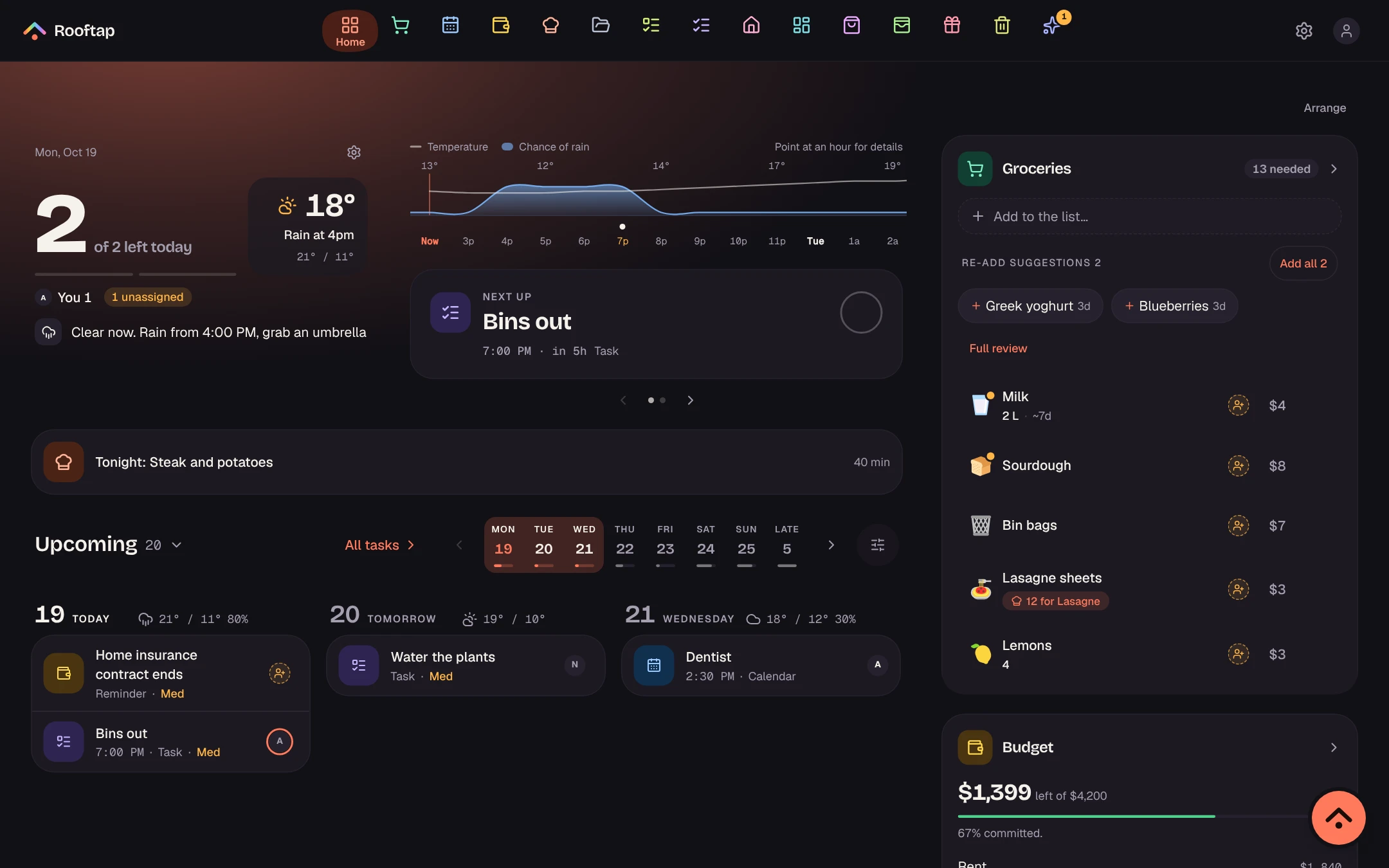
Home on a wide screen: today, the weather chart and the week board on the left, Groceries, Budget and Bills on the right

Three steps

One script generates the secrets and starts the stack.

  1. Install Docker

    Docker Engine with Compose, on a server, a NAS or a small board computer.

  2. Run the script

    It generates the secrets on first boot and starts the stack.

    git clone https://github.com/guybnd/rooftap
    cd rooftap && cp .env.example .env
    ./scripts/self-host-init.sh -d
  3. Open the app

    Open port 3737 in a browser and create the first account. The Android app asks for your server address on first run.

Stack.
Next.js app, Postgres, auth, file storage and realtime, as Docker containers on your own machine. No cloud account.
Tiles.
HOMEUP_MODULES lists the tiles your server offers. The rest are not served.
Clients.
The web app, and the Android app (APK). Both point at your server.
MCP.
The MCP server runs on your machine. Your assistant talks to it, not to us.
Assistant.
The household assistant runs in the same app, with the model you pick, and answers on your own Telegram bot.
Upgrades.
Each upgrade backs up the database before it runs the migrations. One script restores the backup.
Remote access.
Tailscale Funnel and Cloudflare Tunnel profiles give the phone HTTPS with no open ports.
Google optional.
Sign-in with Google and Calendar sync are add-ons. Everything else works without them.
Price.
Free to self-host.

An assistant on your own server

The Assistant module runs inside your Rooftap server. It reads and, with your OK, changes your tasks, calendar, budget, groceries, recipes and lists. Pick the model. Talk to it in the app or through your own Telegram bot.

# .env: a local model in Ollama
ASSISTANT_PROVIDER=compatible
ASSISTANT_BASE_URL=http://ollama:11434/v1
ASSISTANT_MODEL=llama3.1:8b
# your own bot, from @BotFather
TELEGRAM_BOT_TOKEN=...
TELEGRAM_WEBHOOK_SECRET=...

docker compose --profile telegram up -d
Any model.
A key for Gemini, OpenAI, Anthropic or OpenRouter, or a local model in Ollama or LM Studio. With a local model, no prompt leaves your network.
Your Telegram bot.
The poller runs in Docker and needs no open ports. Each person links an account with a code. The history stays in your database.
Trust per tile.
Read, Ask first or Act. A delete always asks. Changes under Ask first wait for a tap in the app or on Telegram.
No caps.
A self-hosted server has no plan and no spending limit unless an owner sets a budget.
Spending.
A household budget, a limit per person, and usage by person, by feature and by model.
Home Assistant.
Connect Home Assistant's MCP Server with a long-lived token. The assistant reads and controls what you expose to Assist, under one trust level and a switch per tool.
Hosted.
On the hosted service the Assistant needs the Plus plan. Plus is not on sale yet.

Ask your assistant

Connect Claude or any MCP client with a key. It reads and writes groceries, tasks, calendar events and costs. Each key can be read-only, limited to some tools, and set to expire.

Pick a question below.

Recorded answers from an assistant connected to the demo household over MCP.

Every feature

Show all 84 features

Everywhere

  • Shared householdeveryone sees each change as it happens
  • Every platforma web app (PWA) on any OS, native Android, and on iPhone from the Home Screen with notifications
  • Offlinereads work without a connection, writes sync after
  • Captureone + adds anything to any tile, and finds what is already there
  • Share sheeta link or a photo from any app
  • Skylight widgetUpcoming by day on your Android home screen
  • Weather on Homethe forecast and the hour the rain starts
  • Tiles per householdthe owner picks; each person hides the rest
  • Ember Night and Daythemes that follow the phone
  • Hapticsa pulse on every tick, swipe and commit

Tasks

  • Assignmentsa name on every chore
  • Repeatschores on your schedule
  • Snooze and prioritylater, or first
  • Commentsa thread on a task
  • Checklist on a taskthe meter fills as it is ticked
  • Notificationswhen a task is yours, due, or commented on

Groceries

  • Aisles you namesorted in the order of your shop
  • Shelf lifeoffered again before it runs low
  • Essentialsthe things the house never runs out of
  • Price memorythe last price and the lowest
  • Rewards cardsany barcode, one tap at the checkout
  • Receipt scanthe total and the store, from the photo

Recipes

  • Recipe scana cookbook page becomes a recipe
  • Can make nowevery ingredient is in the house
  • Add missingon the grocery list, in their aisles
  • To trya list of recipes you want to cook
  • Meal plana dinner and a cook for each night of the week
  • Draft my weekthe Assistant plans the empty nights
  • Cook modeone step at a time, with timers
  • Several at onceeach recipe keeps its own step and timers

Occasions

  • Occasionsbirthdays, anniversaries and holidays, every year
  • Gift ideaswith a status and a budget per occasion
  • Wishlistsone per person, which the household can read
  • Keep it fromthe person a plan is for does not see it
  • Watch the pricea gift idea on the Shopper watchlist

Around the house

  • Bin nightwhich bins go out tonight, and whose turn
  • Bin daystyped, from the council calendar, or from Home Assistant
  • Home careupkeep jobs with a schedule and a reminder
  • Suggestionscommon jobs to pick from

Calendar

  • Google Calendartwo-way sync, per person
  • Event from a linka page, a ticket photo or a calendar file
  • Leave-by pushesfrom travel time and weather
  • Dated itemstasks and checklists appear by themselves

Bills and costs

  • Goal and forecastthe month against a goal, and where it ends
  • Worth a lookcategories that run ahead, plans that end soon
  • Who payssplit bills between the people in the house
  • Contract remindersbefore an insurance or a gym contract ends
  • Lease noticebefore the notice period on your lease

Documents

  • Documents with datesa reminder before a warranty expires
  • Document formswarranty, insurance, vehicle and lease
  • Attachmentson a bill, an event, a trip or a recipe

Checklists

  • Templatesstart a list from a template
  • Dated listsa to-do in Tasks on the day
  • Log purchaseseach ticked item can write a cost

Moving house

  • Home searchpaste a listing link; a map with shops and transport
  • Viewingschecklists and dealbreakers
  • Home setupa buy list for every room of the new place

Shopper

  • Watchlistthe things the house wants to buy
  • Deal ratinggreat, good, fair or above usual, from 90 days of prices
  • Target pricethe row says when a store reaches it
  • Price historya daily low per item, on your server
  • Every storeprice, distance and stock
  • Price sourcespluggable per region, and open to new ones
  • Plan to buya to-do in Tasks and a planned cost in Costs
  • Scoutup to three AI picks for a brief, each with its reason, and follow-up questions

Rewards

  • Card walletloyalty cards and memberships, shared or just yours
  • Store lookuptype a store, see which card works there
  • Partner storesmany per scheme, from a starter list or a pasted list
  • Perksthe ones that end soon first
  • Expirywhen a membership runs out

Assistant

  • Quick asksclose 30 minutes after the last message
  • Named chatskept and pinned
  • Household threadone thread the whole house shares
  • Trust per tileread, ask first or act
  • Any modela cloud key or a local model
  • Spendinga budget per household and per person
  • Telegramyour own bot, history in the app
  • Home Assistantlights, locks and climate, through its MCP Server
  • Web searchplaces near you, with distance and hours
  • Photossend a photo with a message
  • Memoryfacts the household can read and remove

For your assistant

  • MCP serverread-only mode and a tool picker per key
  • API keyswith an expiry you choose
  • Your own roofself-host with one script and Docker

Questions

Where is my data?
On the server you run, in its Postgres database. Nothing leaves it unless you turn on an add-on such as Google Calendar sync.
What does it cost?
Self-hosting is free.
Which platforms?
A web app you can install on any OS as a PWA, and a native Android app. Both point at your server. On an iPhone, add the web app to the Home Screen from Safari for notifications (iOS 16.4 or later).
What is the licence?
The Elastic License 2.0. You can read the source, run it and change it for your own household. You cannot offer it to others as a hosted service.
Can my AI assistant use it?
Yes. Rooftap has an MCP server. Each key can be read-only, limited to some tools, and set to expire.
Is the Assistant free?
On a self-hosted server, yes. You bring a model key or run a local model. On the hosted service the Assistant needs the Plus plan, which is not on sale yet.
Does the Assistant change things without asking?
Only where an owner sets a tile to Act. The default is Ask first: each change waits for a tap. A delete always asks.
Does it work with Home Assistant?
Yes. The Assistant connects to Home Assistant's MCP Server integration with a long-lived token. It sees and controls only the devices you expose to Assist. A self-hosted server can reach Home Assistant on your LAN.
Where do Shopper prices come from?
From the sources your server has for its region. An AU server ships with Google Shopping via SerpApi, OpenStreetMap and OzBargain. You can add a price by hand, or write a source.